📚 Computer Skills
Lesson 4: Learning to Right-Click
Let’s learn how to use the mouse to right-click and open special menus on the screen!
What You Will Learn
- How to right-click with the mouse
- How to open a menu with choices
- How to pick the correct choice from the menu
✅ Mouse Check

Let’s Learn Where to Click
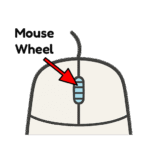
Here’s a picture to help you see which part of the mouse to press. Look at your mouse and see if you can see the Right Click button.
📝 Your Assignment
- Right-click on a picture to see the menu.
- Choose Open.
- Do this for all 6 pictures.
- Raise your hand when finished.
Opened: 0 / 6
🎉 Great job! You unlocked all the boxes!
💬 What Did You Think?
- What happens if you click the left button instead of the right?
- Was it easy or hard to click on the word Open?