Mouse Practice for Kids: Simple Beginner Lesson
Mouse Practice for Kids teaches these core mouse skills one at a time through short, focused lessons.
Core Mouse Skills Taught in Mouse Practice
- Left-Click: Move the cursor to the ball and left-click it to kick it into the goal. The ball always goes in – the focus is pressing the left button.
- Drag and Drop: Click and hold on a shape, then drag it to its matching spot and release to place it.
- Double-Click: Double-click on items to open them or reveal something.
- Right-Click: Right-click anywhere to bring up a basic menu and try the options.
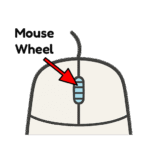
- Scroll: Use the mouse wheel to scroll up and down through the scene.
Benefits of Mouse Practice for Kids
Mouse Practice is a free online activity that gives beginners a clear, straightforward introduction to basic computer mouse skills. No distractions, ads, or registration.
This activity helps beginners in a few big ways. It builds fine motor skills through actions like clicking, holding, dragging, and scrolling. These same moves help with writing, drawing, and using small tools later.
It also improves hand-eye coordination. Kids learn to match what they see on screen with their hand actions-like moving the cursor to click the ball or dragging shapes to the right place. The short lessons give quick wins, so beginners feel good and confident fast. No frustration. Just easy practice.
Building Good Habits
Technology is powerful, but balance matters. Lessons on Teach.Land are designed for guided play, not endless screen time. For more guidance, see the AAP’s Media and Young Minds guidelines.