Lesson 6: Epic Mouse Speed Dash!
About This Activity
Mouse Speed Dash combines everything kids practice in the earlier mouse lessons into one timed challenge. Clicking, dragging, right-clicking, and scrolling are all core computer skills that children use every day in school and at home. By putting them all together in a single activity, kids get to see how much they have improved.
This activity is great for ages 6 and up. It works on any desktop or laptop computer with a standard mouse or trackpad.
Ready? Hit Start and race the clock!
📝 Your Assignment
Complete the three steps as fast as you can:
- Click the targets that appear on the screen.
- Drag the items into the correct bins.
- Scroll down to find the star at the bottom.
Mouse Speed Race
Complete 4 mouse challenges as fast as you can. Click Start when you are ready!
Click the targets
Click 5 targets as fast as you can.
Drag into the right bin
Drag each item into the correct bin.
Right-click the door
Right-click the door and choose Open or Close. Do it twice to complete the phase.
Scroll to the star
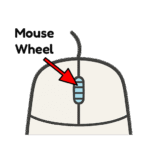
Use your scroll wheel to scroll down and find the star.
Race Complete!
Great job! You completed all 4 mouse challenges.
💬 What Did You Think?
- Which part was the easiest-clicking, dragging, or scrolling?
- Which part was the hardest?